Authorization Process for using API Services
Authorization to make API calls follows the OAuth2 protocol. To the register an establishment, the Automation Developer will have access the appropriate credentials to use the API. These credentials consist of a site_id and a site_secret corresponding to the establishment. As an initial step to start using the resources of the Omnichannel API, Automation must inform these two parameters to the API endpoint /auth-token to obtain authorization tokens. Done this step, the Automation must inform these tokens in all calls to API services.
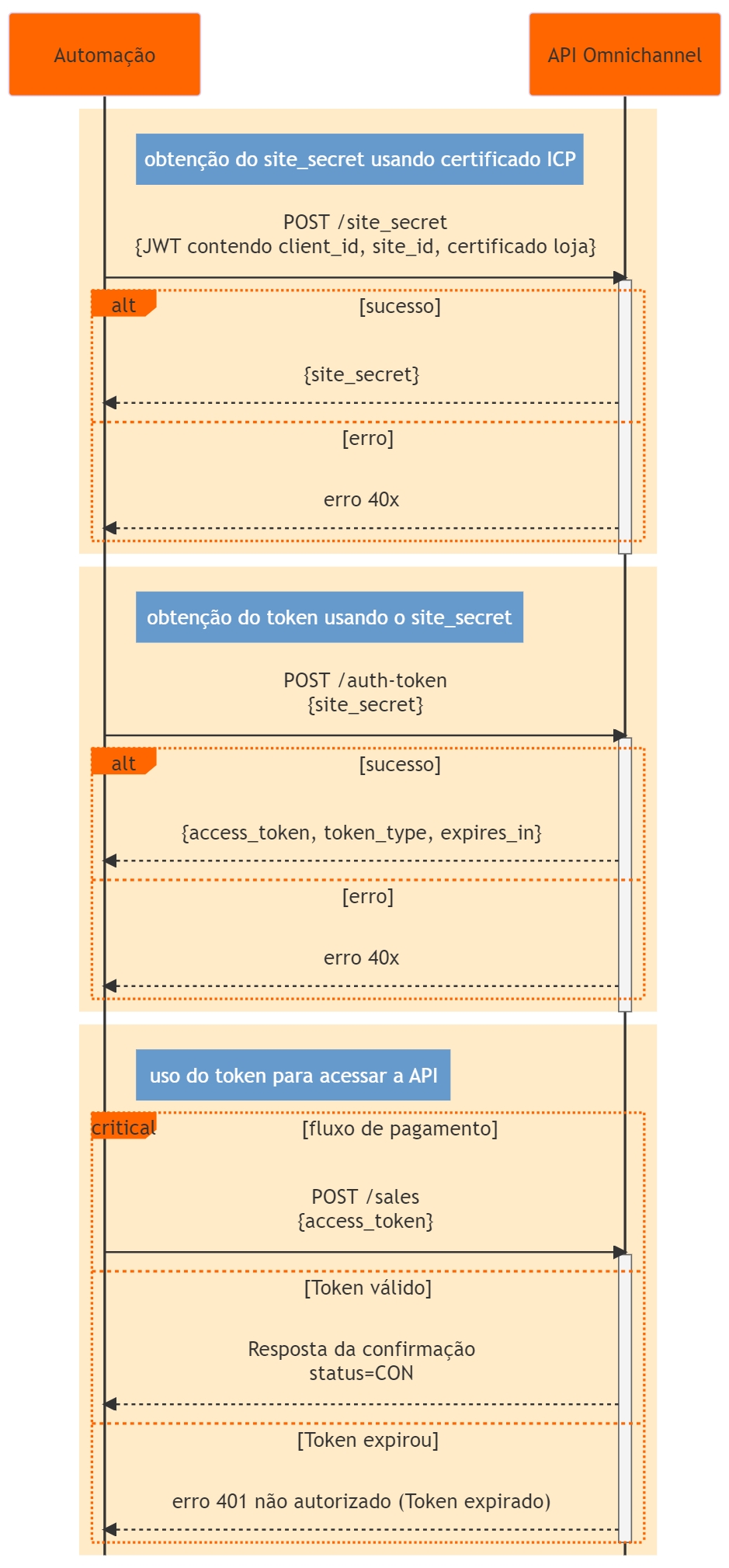
[Generation of store secret_site]#
Automation can obtain a store's site_secret in two ways different options: in person via the customer service channel or "programmatically" via the API.
When starting the integration process, the Customer or Developer You can ask our support team for these credentials. Will fit Developer provides a way for Customer to install these credentials in Automation in a secure way.
If the Customer has a digital signature of the ICP-Brasil chain, the Automation can, at runtime, use the Omnichannel API to generate and download credentials. This section describes the endpoint for this purpose. With each call to the endpoint, a new site_secret is generated and the previous one loses its validity.
The site_secret is equivalent to a password associated with each site_id and serves the authentication purpose to obtain the auth-token. That is, he allows the application to carry out transactions with the Omni API on behalf of the site_id. Therefore it must be stored securely in the application.
We also recommend that the automation renew the site_secret periodically. If you use this endpoint, it is possible, for example, to renew the site_secret daily.
Call details#
The details of this operation are still under discussion (parameters may change).
Resource: /v1/site_secret
HTTP Method: [POST]
Content-Type: application/json;charset=UTF-8
Body parameters:
| Parameter | Description | Type | Size | Required |
|---|---|---|---|---|
| certificate_chain | Certificate chain file for signature validation. It must contain the ICP Certificate (public key signed by the CA) corresponding to the CNPJ of the store associated with the informed site_id. We recommend that it also contains the intermediate certificates from the CA that signed the store certificate. The format must be a PEM string with the sequence “\n” in place of line breaks. | String | ||
| jwt | The content of this parameter must be an encoded JSON Web Token (JWT), that is, a String in the format: <Header encoded in Base64Url>.<Payload encoded in Base64Url>.<Signature of (Header + "." + Payload) encoded in Base64Url> Follow the Header and Payload specifications informed in the jwt content table below. | String |
| jwt content | ||||
|---|---|---|---|---|
| Header | ||||
| Parameter | Description | Type | Size | Required |
| alg | RS256 Value | String | YES | |
| typ | JWT Value | String | YES | |
| Payload | ||||
| Parameter | Description | Type | Size | Required |
| iss | Full and unmodified content of the Common Name field of the ICP certificate (normally in the format “Business Name:CNPJ) | String | YES | |
| sub | Site_id value | String | YES | |
| aud | “omnichannel” value | |||
| iat | Time of creation of this JWT in RFC 7519 NumericDate format (number of seconds since 1970-01-01T00:00:00Z UTC) | Number | YES | |
| clientId | ClientId value | String | YES | |
Gateway extra parameter | Extra Gateway parameters are additional store identification parameters defined by the Payment Gateway (that is, it is up to the Payment Gateway to specify and inform these parameters to the Automation). The Omni server will use these and other Payload parameters to authenticate the store with the Payment Gateway. The extra parameters will be passed to the Gateway without change. For example, if the Automation is integrating with the Bin Acquirer Gateway, the extra parameters should be: "institutionNumber": [String], "serviceContractId": [String], "terminalId": [String], "merchantId": [String] | String | YES |
Response#
- Content-Type: application/json;charset=UTF-8
| Parameter | Description | Type | Size | Required |
|---|---|---|---|---|
| site_secret | Authorization token for access to API services | String |
Example#
Unencoded JWT content (for illustration only for reproduction example, as it is not sent in this format):
Request and Response
Token#
Before calling any API service, Automation must first generate an authorization token via the /auth-token endpoint. Each token has an expiration time, so the Automation also needs to generate the token whenever this validity expires.
Call details#
Resource: /v1/auth-token
HTTP Method: POST
Content-Type: application/x-www-form-urlencoded
Body parameters:
| Parameter | Description | Type | Size | Required |
|---|---|---|---|---|
| grant_type | Authorization type (always use the value “client_credentials”) | AN | ?? | YES |
| site_id | Store identification requesting API resource | AN | ?? | YES |
| site_secret | Store password | AN | ?? | YES |
| client_id | ||||
Response#
Content-Type: application/json;charset=UTF-8
Body:
| Parameter | Description | Type | Size | Required |
|---|---|---|---|---|
| access_token | Authorization token for access to API services | AN | ?? | YES |
| token_type | Token type (always “Bearer”) | AN | ?? | YES |
| expires_in | Time in seconds | N | ?? | YES |
Example#
Request and Response
Token usage#
In other API calls, Automation must include the token in the field "Authorization" header, in the following format:
Authorization: Bearer access_token value
If the call results in an HTTP 401 error, the Automation must generate a new token.
Secret exchange and shipping policy#
Good practice requires that the site_secret should be changed from time to time. times and the automation is responsible for changing the site_secret.
Fiserv's security area determines that the process of passing the site_secret must be done in a way that meets security standards, cannot involve clear sending by email or by means already considered insecure.